AI Room Makeover App: From Photo to Makeover in Under a Minute
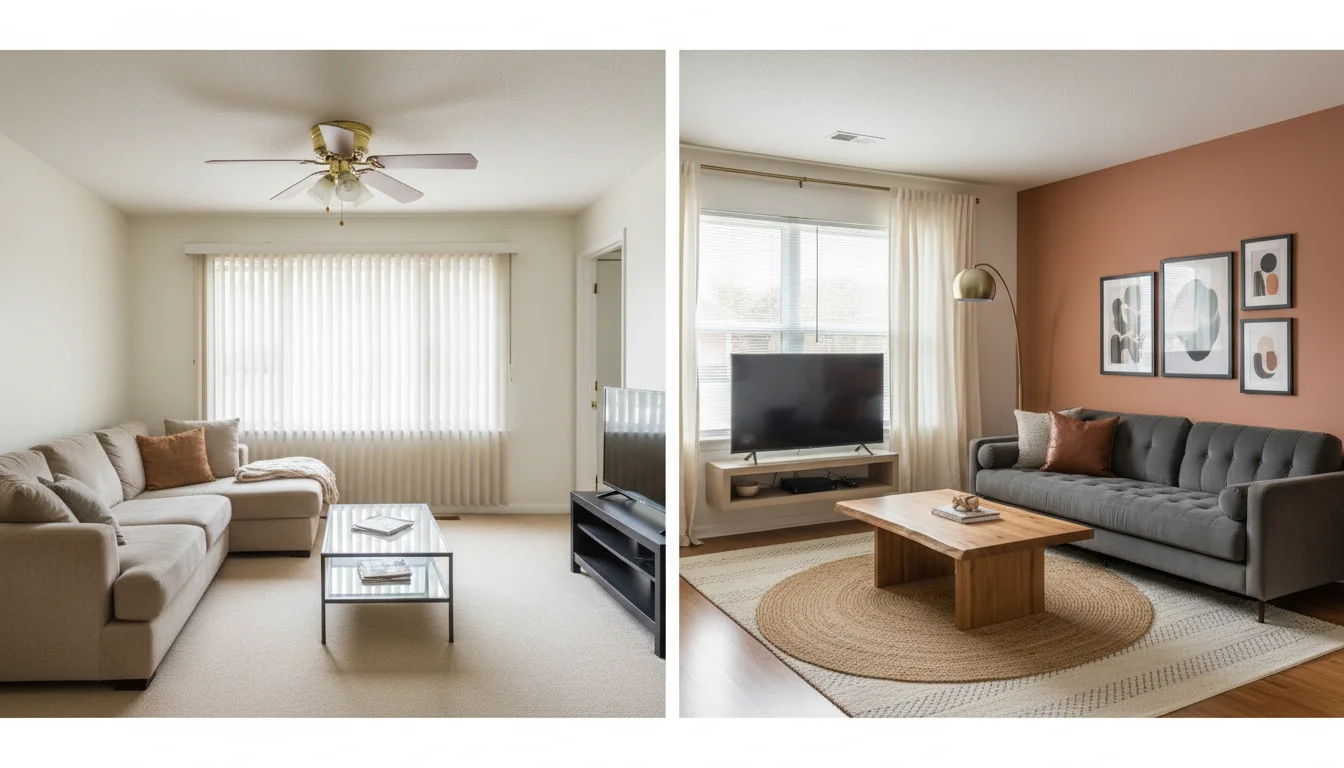
You took a photo of your living room three weeks ago meaning to do something about it. The brass ceiling fan from 2012, the beige sectional, the glass coffee table that already shows every cup ring — the room is fine. Functional. Forgettable. You don’t want a full renovation, and you don’t want to hire a designer for $3,000 to tell you the room is fine. What you want is a credible, photoreal preview of what the room could look like with $2,500 worth of swaps, before you commit a dollar.
An AI room makeover app is the closest thing the consumer market has to that preview. You feed it the photo, you pick a style, and ninety seconds later you have a render of the same room — same windows, same proportions, same architectural bones — finished the way a designer would have finished it. This guide is the working tour of the category: what counts as an AI room makeover, the standard photo-in-styles-out workflow, the signature features that separate paid apps from free demos, five real examples, how a makeover app differs from a full design app, and the FAQ everyone asks before downloading one.
What is an AI room makeover app? An AI room makeover app is a mobile app that takes a single photo of a real room and generates a photoreal render of that same room redesigned in a chosen style. The app keeps the room’s geometry — walls, windows, doors, ceiling height, room footprint — and replaces the freestanding furniture, soft furnishings, paint, finishes, lighting, and decor based on a style prompt. Most apps in 2026 produce a finished render in 30 to 90 seconds from a phone photo, use credit-based pricing for additional renders, and ship a built-in furniture-shopping layer that ties each rendered piece to something you can actually buy. The category is best understood as a designer’s mood-board pass, compressed into a phone-shaped tool that anyone can use.
What counts as an AI room makeover
Not every “AI redesign” online is an AI room makeover in the consumer sense. The category has a working definition, and the term gets used loosely.
A true AI room makeover starts from a photo of a real room. The “before” is a real phone shot — not a 3D model, not a fully generated synthetic space, not a stock interior. If the before is also AI-generated, what you’re looking at is a design demo, not a makeover. The whole appeal of the category is that the after is anchored to your actual space.
It preserves the room’s geometry. Walls don’t move, windows don’t shrink or grow, the doorway stays where it is, the ceiling line holds. The app changes the decor layer — paint, soft furnishings, freestanding furniture, lighting, finishes, hardware — and leaves the bones alone. An app that quietly enlarges the room to fit a sectional is producing a fantasy render, not a buildable makeover.
It returns a single photoreal image, not a moodboard. A makeover app’s job is to show you the room itself, in continuous photoreal output, so you can see how the new pieces sit in the actual light and against the actual walls. The render should be good enough that a passerby could mistake it for a real photo for two or three seconds.
It finishes in under two minutes from your phone. That workflow boundary separates consumer makeover apps from professional AI design tools, which take longer, ask more configuration questions, and let you control more variables. Our AI interior design app overview goes deeper on the consumer-app tradeoffs.
A product that meets those four checks is an AI room makeover app. A product that misses one is something adjacent — a mood-board tool, a virtual staging service, a generic AI image generator. Useful, but a different category.
Photo-in, styles-out: the standard workflow
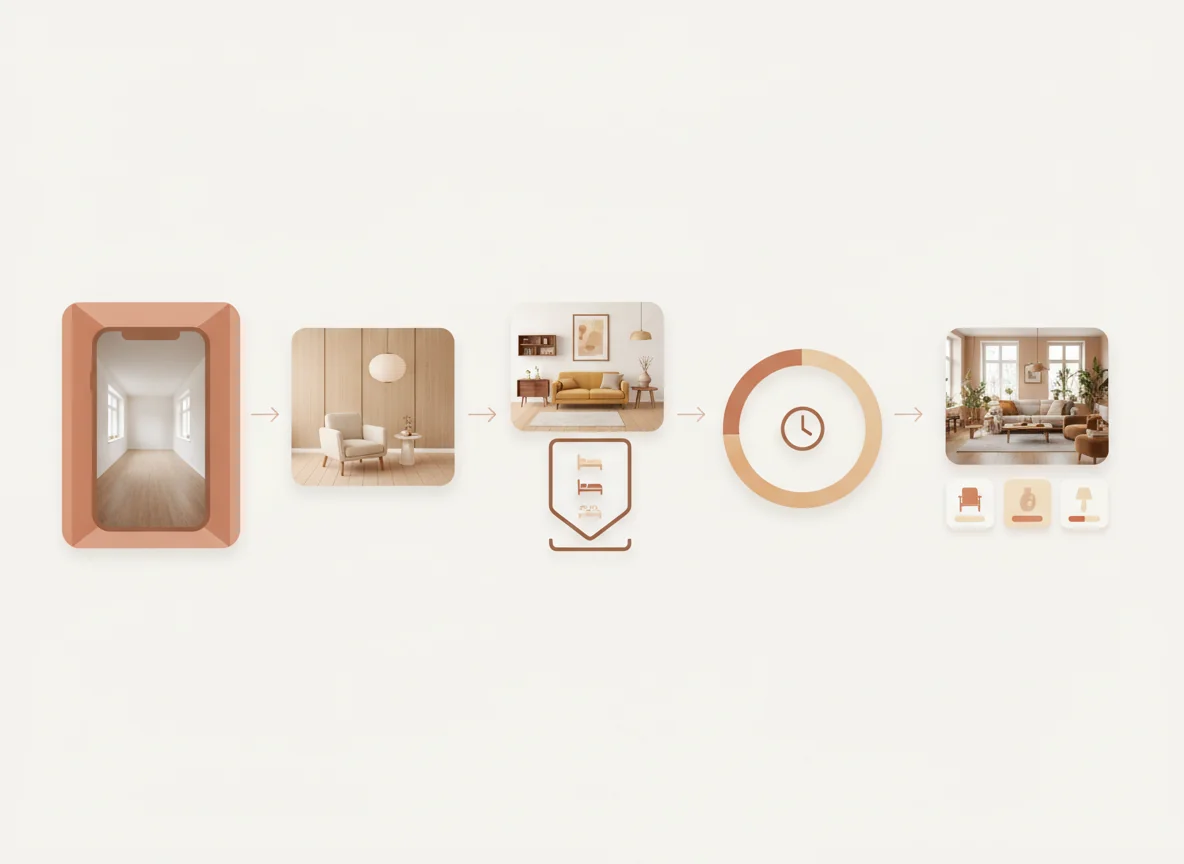
The category has converged on a workflow tight enough that most makeover apps in 2026 look like minor variants of the same five steps. Knowing the steps in advance is the difference between a render you’d live with and one you’d delete.
Step one — take or upload a photo. Most apps default to the camera; you can also upload from your library. The single best photo is shot from the doorway, framed in one-point perspective with both walls and the floor visible, in soft daylight, with the phone held at chest height. Our how to take photos for AI room design post is the working playbook; getting this right is worth more than any other input.
Step two — pick a style. Every app has a style picker. Some use named styles (Japandi, mid-century modern, warm contemporary, English country, Scandinavian, industrial loft) and some let you write free-text prompts. Named pickers are faster and produce tighter results; free-text rewards specificity — see our how to prompt AI interior design apps post for the four-variable formula.
Step three — choose a room type. Living room, bedroom, kitchen, bathroom, home office, dining room, nursery, basement. The app uses the room type to bias what it’s looking for in the photo and what furniture to render. Labeling a home office as a “bedroom” because there’s a daybed in it tells the app to render a bed against the wall.
Step four — wait 30 to 90 seconds. The render appears. Most apps queue the request server-side; the heavy lifting is happening on a GPU somewhere, not on your phone. Decent apps generate three to five variants from a single tap so you have a comparison set instead of a binary “did it work.”
Step five — iterate or save. From the result, you can regenerate with a tweaked prompt, swap styles with the same photo, save the render to your camera roll, or — in the better apps — tap individual pieces to see real-world products that match. Iteration is where the category earns its keep; the first render is rarely the keeper, but the third or fourth usually is.
Signature features worth paying for
Most makeover apps are free to try and credit-based after the first three to five renders. The pricing tier matters less than the feature set, because two apps at the same price point can be wildly different products. The signature features worth paying for, in rough order of impact:
Geometry preservation that actually holds. The single most important feature. Generate two or three test renders and compare them against the original photo. Did the window move? Did the doorway shrink? Apps that fail the geometry check produce flattering renders that don’t correspond to your room — pretty but unbuildable. Most paid apps in 2026 hold geometry well; many free apps don’t.
Shoppable furniture matching. The render is only half the product. The other half is the layer that turns each rendered piece — sofa, lamp, rug, coffee table, art — into a real product with a price, retailer link, and dimensions. The worst apps generate beautiful furniture that exists only in the AI’s imagination, which is fun and useless. Our AI furniture matching app post goes deeper on what good furniture matching looks like.
Style fidelity across named aesthetics. Generic “modern” renders are easy. The harder test is whether the app produces a recognizably Japandi room that looks different from a recognizably Scandinavian one. Run the same photo through three or four named styles; if the outputs all converge on the same beige-and-oak room, the style picker is mostly cosmetic.
Multi-variant output per tap. Generating one render per credit is wasteful. The better apps return three to five variants for the price of one, giving you a comparison set per generation without burning through credits.
Iteration controls that don’t reset the room. When you swap “bouclé” to “velvet” in the prompt, the rest of the render should hold steady. The good apps treat the prompt as additive — change one variable, regenerate, see what moved.
A subscription that delivers all five is worth $10–$15 a month for the value of avoiding a single bad furniture purchase. A subscription that delivers only one or two is a worse deal than the free tier of a better app. Our AI home design apps roundup compares the leading apps on these dimensions directly.
Five real makeover examples
The fastest way to internalize what a good AI room makeover app produces is to look at five real before-and-after pairs across the room types that get redesigned most. Each was generated from a single phone photo in under 90 seconds. Each labeled with the style prompt and the four or five swaps that did most of the heavy lifting.
Living room → warm contemporary. A mid-2010s suburban living room: beige microfiber sectional, glass coffee table, brass ceiling fan, vertical blinds. Prompt: “warm contemporary, charcoal bouclé sofa, oak and brass accents, layered natural-fiber rugs, clay accent wall behind the TV.” The sectional became a charcoal bouclé sofa, the glass coffee table became a low oak slab, a brass arc lamp filled the empty corner, and a single clay-toned accent wall went up behind the TV. Windows, trim, and footprint stayed put. Budget at U.S. mid-market prices: roughly $2,800.
Bedroom → Japandi. A builder-grade primary suite: queen bed with a beige upholstered headboard, two mismatched nightstands, a globe overhead light, beige carpet. Prompt: “Japandi, low-profile platform bed, matching pale-oak nightstands, linen bedding in oatmeal and soft black, paper pendant lamp, woven floor rug.” The bed held position. Nightstands became matching pale oak, polyester bedding became layered linen, the globe became a paper pendant, and a handwoven rug softened the carpet without replacing it. Budget: roughly $2,200.
Kitchen → moody bistro. A small galley kitchen in an older apartment: white cabinets, faux-marble laminate counters, builder pendant. Prompt: “moody bistro kitchen, deep forest-green lower cabinets, brass hardware, warm-white upper open shelving, brass pendant over the sink, butcher block counters, terracotta floor tile.” Sink, range, and fridge stayed put — the AI respected the plumbing layout. Lower cabinets repainted, hardware swapped, uppers replaced with open shelving, counters swapped to butcher block, floor replaced. Budget: roughly $5,500 in finishes.
Home office → focused minimalist. A guest room with a desk crammed into a corner: particleboard desk, black gaming chair, daybed, unframed posters tacked to the wall. Prompt: “minimalist focused home office, oak floating desk, walnut task chair in tan leather, framed monochrome prints in a grid, neutral linen daybed.” The visual noise collapsed: oak floating desk, walnut-frame leather chair, a grid of six framed prints in place of the tacked-up posters. Budget: roughly $1,600.
Basement → warm flex lounge. An unfinished basement: poured concrete floor, exposed ceiling, drywall on two walls, dim overhead bulb. Prompt: “warm finished basement lounge, polished concrete floor in warm grey, matte black painted ceiling joists, two facing oatmeal modular sofas, low walnut coffee table, large jute rug, built-in bookshelf.” The render preserved the concrete, the exposed ceiling (painted), and the existing drywall (painted warm white). A real lounge without a permit. Budget: roughly $4,200, versus the $30,000–$60,000 to fully finish.
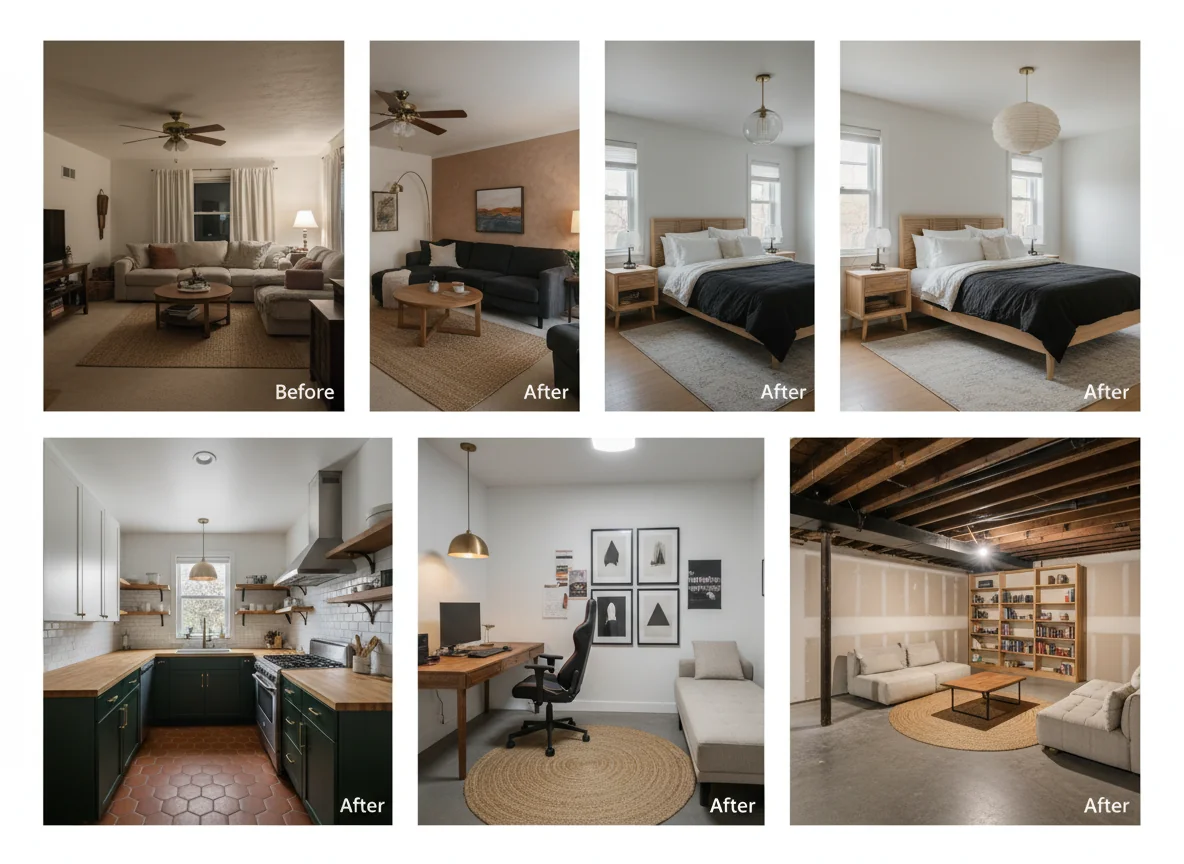
A consistent pattern across all five: the AI changed the decor layer and preserved the architectural layer. This is the mental model that makes a makeover app useful instead of decorative. A redesign that respects the architecture is a redesign you can actually build, one purchase at a time. A redesign that quietly moves a window is a fantasy.
Makeover app vs full design app
The category labels — “AI room makeover app,” “AI interior design app,” “AI home design app” — get used interchangeably, but they describe meaningfully different products. The cleanest split is around what the tool optimizes for.
A makeover app optimizes for speed and a single-tap experience. Photo in, render out, ninety seconds, one set of choices to make: style. The user is browsing possibilities, not committing to a plan. The goal is a credible preview that’s good enough to decide whether to go further.
A full design app optimizes for control and configurability. The user is closer to commitment — measuring rooms, dragging furniture in 2D plans, building shopping lists, exporting a moodboard or a punch list — and the tool gives them more variables to set. The render quality might be similar, but the surrounding workflow is different.
Most people start with a makeover app, get a render they like, and then either (a) shop the rendered pieces directly, or (b) move to a full design app to refine the plan. That progression is the norm, not the exception.
| Dimension | AI room makeover app | AI full design app |
|---|---|---|
| Primary input | Single phone photo | Photo + measurements + floor plan |
| Time to first render | 30–90 seconds | 5–30 minutes (more configuration) |
| Output | Photoreal render of one room | Render + 2D plan + shopping list |
| Control level | Style + room type | Furniture-by-furniture placement |
| Best for | Browsing styles before committing | Building a plan you’ll actually execute |
| Typical pricing | Free + credit-based, $5–$15/mo subscription | $15–$40/mo subscription |
| Skill level needed | Anyone with a phone | Comfortable with design tools |
| Where it gets stuck | Hard to refine specific pieces | Slow to explore many styles |
Picking between them depends on where you are in the project. If you’re deciding “what style is this room even going to be?” — start with a makeover app. If you’ve already picked the style and now need a buying plan, a full design app is the right tool. Our AI home design apps roundup compares specific products on both sides of this split.
There’s also a third category worth noting: DIY-focused tools and content. If you’d rather skip the AI step entirely and execute the swaps yourself with traditional inspiration, our DIY room makeover ideas guide is the working playbook. Many readers use both — an AI makeover app to lock the vision, then a DIY guide to execute.
For broader category coverage from the design press, Architectural Digest’s recent piece on AI in interior design is a reasonable mainstream primer, and the Houzz 2026 home design trends report tracks what styles people are searching for at scale — useful context for which prompts will land closest to your taste.
FAQ
How accurate are AI room makeover apps in 2026?
For decor-layer changes — paint, soft furnishings, furniture, lighting, finishes — accuracy is high. The major apps preserve room geometry, lighting direction, and architectural elements well, and renders are photoreal enough to mistake for real photos at a glance. Accuracy drops on physical-layout changes (moving a wall, repositioning a window) because those are outside the category’s core promise — these apps redesign the room, they don’t rebuild it.
Do AI room makeover apps work for renters?
Yes, and rentals are arguably the category’s best use case. The workflow is built on swapping the decor layer while preserving the architecture — exactly the constraint renters operate under. Walls, floors, and built-ins stay; sofa, rug, lamps, art, bedding all flex. A renter-targeted render is usually more buildable than an owner-targeted one because the AI’s preservation defaults align with what a renter can actually change.
Can I use the same app for multiple rooms in my home?
Yes. There’s no per-room limit on any of the major apps — each room is a new photo upload. For a multi-room redesign, generate makeovers room-by-room in the same overall style (Japandi living room, Japandi bedroom, Japandi office) so the whole home reads as coherent. Some apps offer a “house style” lock worth turning on.
What kind of photo produces the best AI room makeover?
A doorway shot in one-point perspective with both walls and the floor visible, in soft daylight, phone held at chest height with the lens parallel to the floor. Use the 1x main lens, not the 0.5x ultra-wide. Tidy loose clutter but leave the major furniture in place — the AI uses it as a scale reference. Our how to take photos for AI room design post covers this in depth.
Can AI room makeover apps replace hiring a designer?
For most consumer redesigns under $5,000, yes — the workflow covers the same ground a designer would on a first consultation, at a fraction of the cost. For full renovations, custom millwork, or projects above $25,000 where the cost of being wrong is high, a real designer is still the right call. The apps are best understood as a designer’s first-pass moodboard tool, not a replacement for the structural and procurement work on a real project.
Try a render on your own room
A makeover app delivers most of its value in the first ten minutes. Shoot one doorway photo, pick one named style, generate three or four renders, and decide whether the category is worth more of your time. If the first round is a credible preview of your real room, you’ve found the right tool.
RoomGenius is the AI room makeover app you can try right now from the App Store or Google Play. The free tier covers the first few renders, the style library spans the major named aesthetics, and the shopping layer ties each rendered piece to a real product. The AI interior design overview is the right next read for the broader picture. Otherwise, the doorway photo is thirty seconds away — and the render is ninety seconds after that.