AI Nursery Design Ideas: Plan the Room Before the Due Date
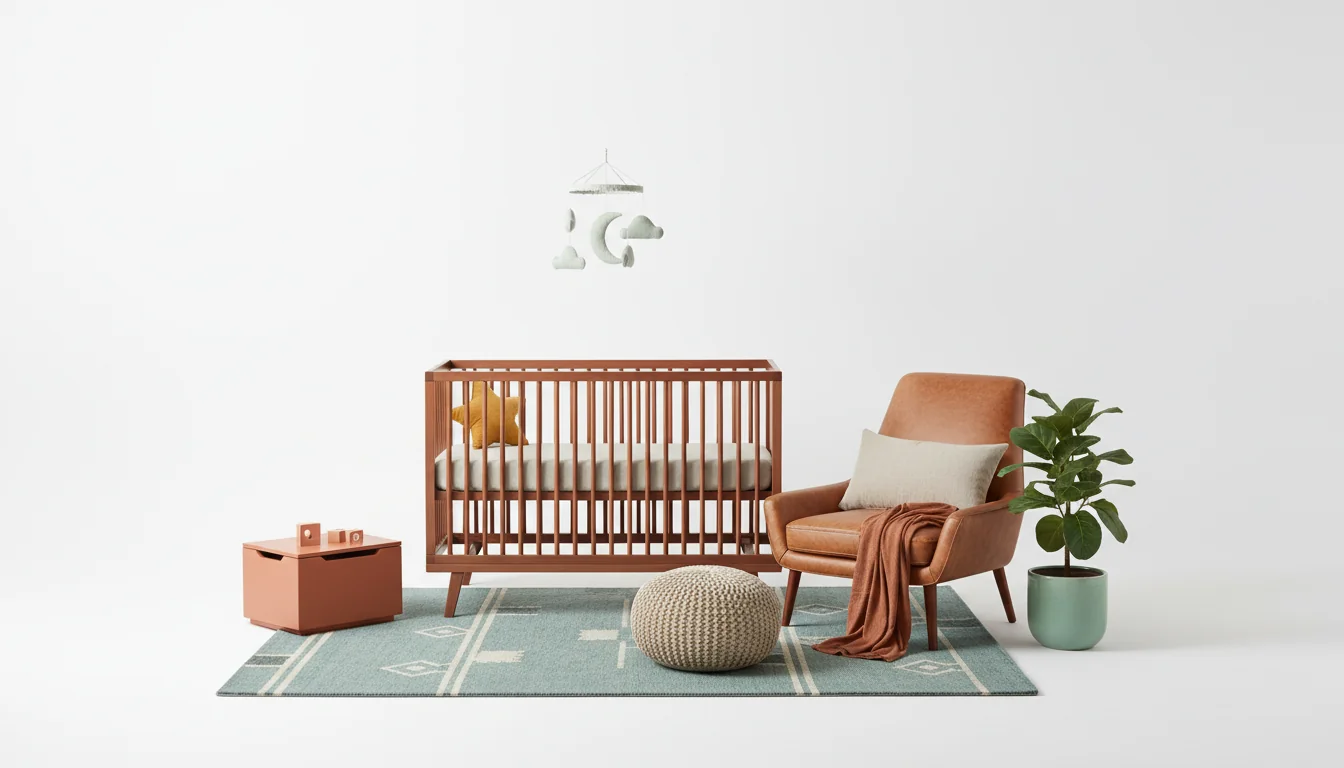
Nobody tells you this part. You technically get nine months, but only about five feel real, and only two feel like preparation. The rest is nausea, logistics, and a slow accumulation of gear in what used to be a guest room. Somewhere around week 28, you open that door, look at the half-assembled crib against a wall you were supposed to paint in January, and realize you still have no clear picture of what this nursery is going to look like.
That is the gap AI nursery design fills. Upload a photo of the room — even if it is a disaster — pick a theme and a palette, and in under a minute the app renders back a styled version of the actual space, with the crib placed, rug down, wall color applied, art hung, curtains set, and storage sized to the room. You are not guessing from a Pinterest board. You are looking at your room, at 36 weeks, with furniture you can actually buy.
This guide covers how AI nursery design works in 2026, which palettes and themes the current generation of models renders cleanly, how to preview a convertible crib layout you can keep through toddlerhood, and — important — the safety checks an AI nursery design tool cannot do for you.
What is AI nursery design? AI nursery design is a photo-to-render workflow where an AI interior design app analyzes a picture of the room and generates styled nursery redesigns — crib placement, palette, wall color, rug, curtains, decor, and shoppable furniture matches — typically in under a minute. Expecting parents use it to compare themes, align with a partner, and preview the room before any crib is assembled.
Why AI Nursery Design Works So Well
Nurseries sit where AI interior design tools shine: high emotion, high spend, high time pressure, and a lot of variables compressed into a small room. A typical nursery build in 2026 costs somewhere between $1,500 and $5,000 once you add crib, dresser, glider, rug, mobile, bedding, curtains, lighting, and art. Most of those purchases happen in a six-to-eight-week window between the baby shower and the due date, by someone whose ankles hurt. Expensive, irreversible-ish, and time-boxed — that is where preview tools earn their keep.
Three things make nurseries a cleaner AI target than, say, a living room:
- The footprint is small. Most nurseries are between 90 and 140 square feet, which keeps the geometry the model has to reason about simple.
- The furniture list is short. Crib, dresser (often doubling as the changing table), glider, rug, storage, lighting, a handful of decor pieces. Fewer slots means fewer places the AI can go wrong.
- The style language is consistent. Woodland, coastal, celestial, Scandinavian, Montessori — AI models trained on interior-design data have seen a lot of each.
The result is that the AI room redesign you get back for a nursery prompt lands closer to reality than the same workflow applied to a kitchen remodel or a maximalist living room. That matters because a lot of these purchases are one-shot. You do not buy two cribs.
You are also not early. Searches around nursery prep climbed steadily in 2025, and the share of expecting parents using some kind of AI design tool during pregnancy more than doubled over the past year.
Gender-Neutral, Boy, and Girl Palettes — Tested Visually
Whatever you think of the phrase, the three most common nursery palette searches are some version of gender-neutral, boy, and girl. AI tools do all three well, but the defaults can feel dated if you do not push back on them. Here is how the three cluster in current renders, with prompts for the modern version of each.
Gender-neutral palettes
Gender-neutral is the most-generated nursery palette in the training data, which means it renders the cleanest. The modern version is not actually neutral — it leans warm. Expect warm oatmeal walls, walnut or light oak wood, pale sage accents, burnt sienna throws, and one cool anchor (muted teal or dusty turquoise) so the room does not collapse into beige. Prompt: “warm gender-neutral nursery, oatmeal and sage and walnut, one cool accent, no beige-on-beige.”
Boy-leaning palettes
Ask for a “boy nursery” with no further guidance and the AI defaults to navy and grey — heavy in a small room with limited natural light, which is what most nurseries have. The update most parents want is cooler and brighter: dusty turquoise, cool cerulean, cognac leather accents, warm oatmeal on walls. Prompt: “modern boy-leaning nursery, dusty turquoise and cognac leather on warm oatmeal, no navy, no grey-on-grey.”
Girl-leaning palettes
The default here is usually blush and cream — fine, but same-y. A warmer 2026 version layers burnt sienna, warm gold, and pale seafoam on a warm oatmeal base — grounded but not sugary. Prompt: “modern girl-leaning nursery, burnt sienna and pale seafoam on warm oatmeal, warm gold accents, no blush overload.”
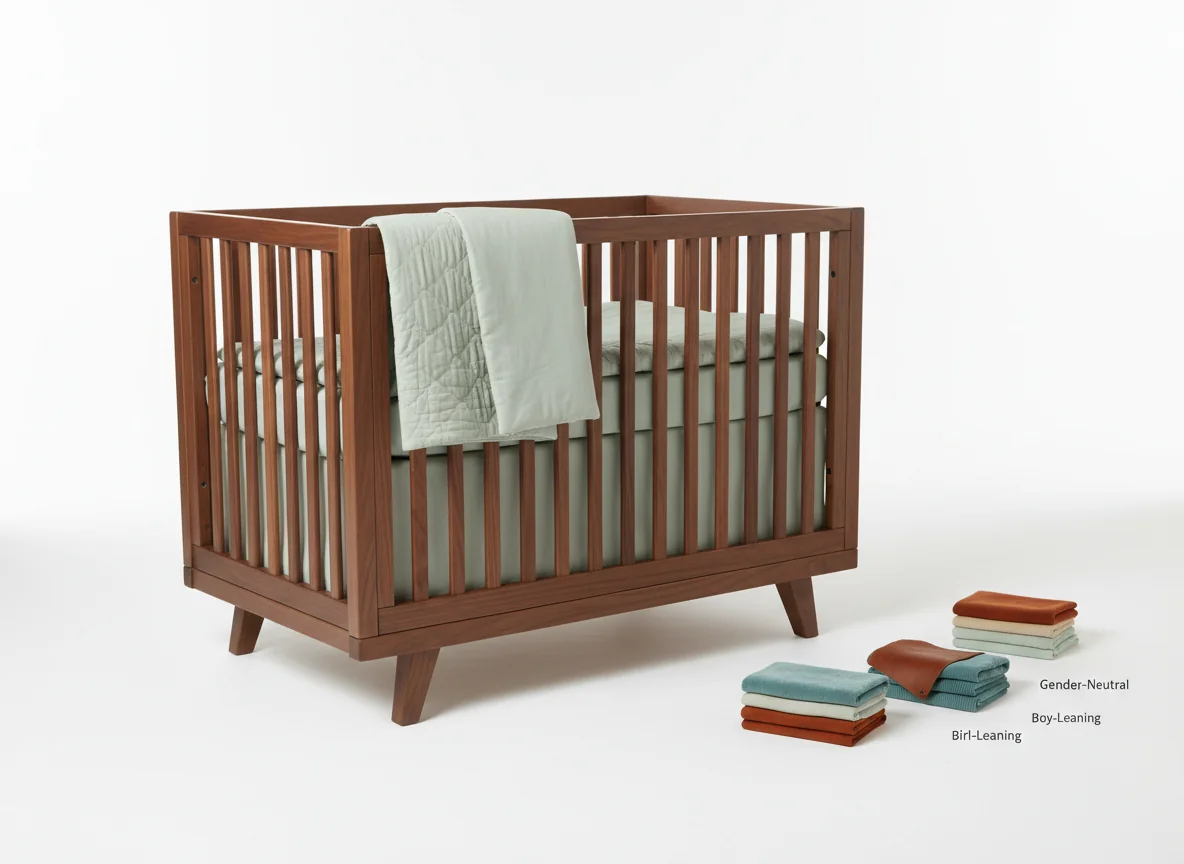
One tactic worth stealing: generate the same theme across all three palettes, then pick the one you respond to viscerally rather than the one that fits a convention. The AI makes that a one-minute exercise that would otherwise take a weekend of swatch-taping. For the underlying color logic — warm vs cool, undertones, how light changes what you see — our best color scheme for bedrooms guide applies equally to a nursery.
Theme Renders: Woodland, Coastal, Celestial, and Montessori
Palette sets the mood. Theme sets the vocabulary. The AI handles some nursery themes better than others, and it is worth knowing which ones will render with authority versus which ones require more prompt work.
Woodland
Woodland is the theme AI renders most confidently because the training data is saturated with it. Expect walnut and light oak wood, sage and moss greens, warm oatmeal textiles, small wooden animal silhouettes, and a single nature print above the crib. It is a good starter render. To push past the obvious version, prompt: “woodland nursery, restrained — walnut crib, sage accents, no antlers, maximum three wooden animal motifs.” Our nature themed bedroom ideas post covers the grown-up version if you want the room to age past toddlerhood gracefully.
Coastal
Coastal nurseries work when you lean on texture and muted color rather than on literal nautical motifs. The render you want is pale oak crib, muted teal and dusty turquoise accents, rattan basket storage, linen curtains, and one framed shell or map print — not a room full of anchors. Prompt: “coastal nursery, linen and rattan, muted teal, one nautical accent maximum, no anchors.”
Celestial
Celestial is where the AI most over-indexes on cliché — painted stars on the ceiling, glow-in-the-dark wallpaper, novelty moon lamps that nobody wants to look at for three years. The restrained version uses cool cerulean or dusty turquoise bedding, warm gold star accents (cushion, mobile, one framed print), and a walnut crib to keep it grounded. Prompt: “celestial nursery, restrained — cool cerulean bedding, warm gold accents, walnut crib, no ceiling murals.”
Montessori
Montessori is the most functional of the four and the one with the tightest rules: floor bed or low crib, low shelving the child can actually reach, a mirror at crawl height, natural wood, minimal decor, no overstimulating pattern. AI renders it well once you specify “low furniture, floor bed, no wall pattern, no toy pile.” If the render comes back with a tall dresser and a full-sized crib, the prompt is not anchored firmly enough.
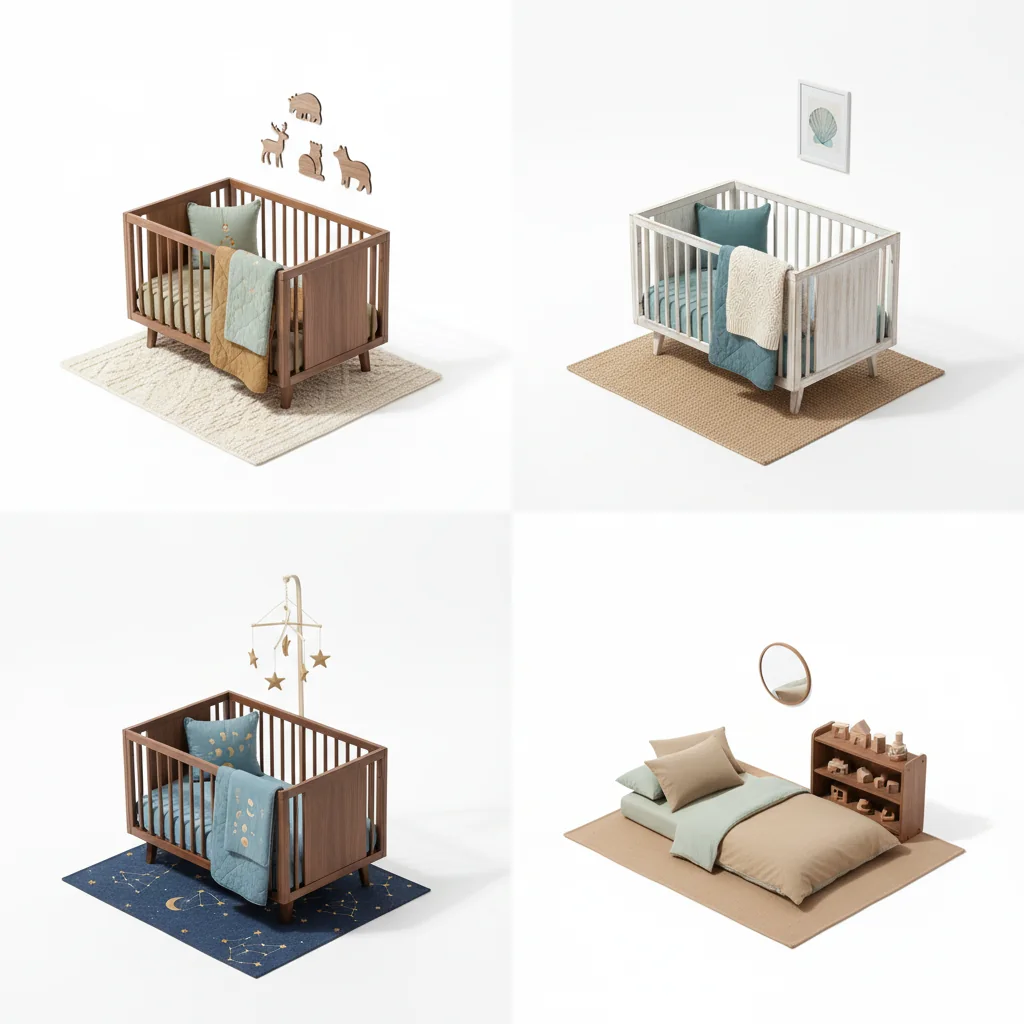
Themes the AI still fumbles include vintage and eclectic nurseries that rely on inherited or found objects, and anything with elaborate hand-painted murals — the model cannot invent craft it has not seen at scale. If those are what you want, use the AI for the background palette and source the craft pieces yourself.
Convertible-Crib Layouts the AI Gets Right
The single most regretted nursery purchase, year after year, is a non-convertible crib. You use it for eighteen months and sell it for a quarter of what you paid. A convertible crib — one that turns into a toddler bed, then a daybed, then a full headboard — is the nursery equivalent of buying a sofa instead of a futon. The catch: each configuration takes up a different amount of space, so planning the crib means planning three or four pieces stacked on the same footprint across five years.
This is where AI nursery design quietly earns its fee. A good AI room redesign renders all three stages of a convertible crib in the same room and lets you see whether the layout holds up as the crib grows with the child.
Three prompts that work well here:
- Stage 1 (newborn-to-toddler): “full convertible crib, drop-side up, nursery layout, glider in corner, dresser with changing pad, 10x11 room.”
- Stage 2 (toddler bed): “same room, same furniture, crib converted to toddler bed with rail removed, add small bookshelf.”
- Stage 3 (daybed or twin): “same room, crib converted to daybed, dresser converted to regular dresser, rug remains, add reading chair.”
The AI will keep the walls and window positions fixed across all three renders, which is what you need in order to tell whether the crib orientation still works once it becomes a toddler bed. Most layout regret stems from the stage-two configuration, not stage one — the toddler bed sticks out further from the wall than the crib did, and suddenly the closet door cannot fully open. You want to see that on a render, not on a Saturday in 2028.
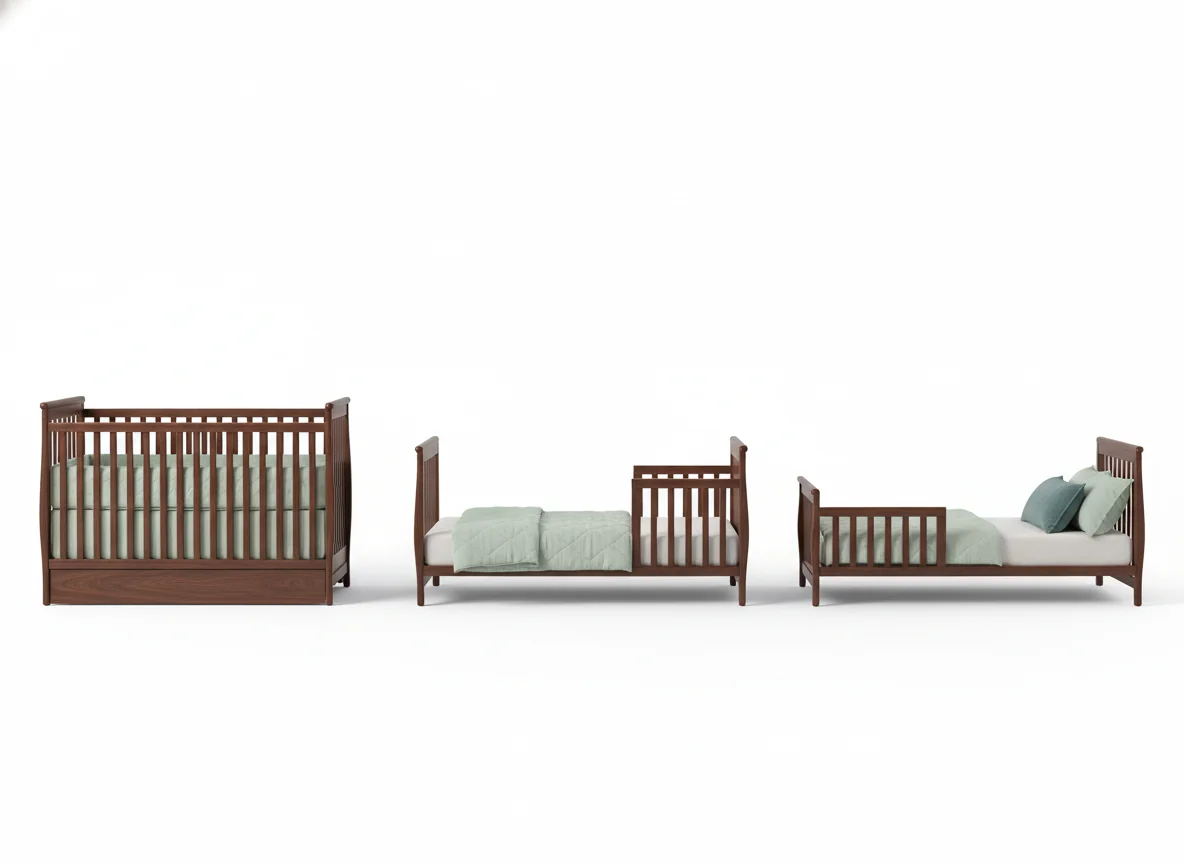
When the AI renders the toddler and daybed configurations, ask it to include the furniture you expect to be in the room at that age — a small table, a bookshelf, a low toy bin. The render you want is not the nursery; it is the room on your kid’s fourth birthday. If that looks crowded, pick a different crib orientation now. Our AI bedroom design post walks through the same photo-to-render logic at slightly larger scale.
Safety-First: What AI Can and Cannot Check
This section matters more than any other. AI nursery design is an aesthetic and planning tool, not a safety tool. The AI will happily render a beautiful room that fails basic nursery safety checks and will not warn you. Here is what current tools can and cannot verify.
| Check | Can the AI do it? | Who is responsible |
|---|---|---|
| Visualize the room layout | Yes | You, with the render |
| Show crib placement against walls | Yes | You, with the render |
| Check crib distance from windows | Partially (visual only) | You, with a tape measure |
| Verify cord/blind safety setback | No | You, with AAP/CPSC guidance |
| Confirm crib slat spacing | No | The manufacturer and CPSC standards |
| Flag recall status on furniture | No | You, via the CPSC recall database |
| Check outlet coverage plans | No | You |
| Validate furniture anchoring | No | You, with anti-tip kits |
| Evaluate paint/finish VOC levels | No | You, via GREENGUARD and similar certs |
The short version: anything that is a regulation, a certification, or a measurement is your job. The AI gives you a trustworthy visual, but it does not replace the American Academy of Pediatrics’ safe sleep guidance or the CPSC’s guidance on cribs, dressers, and window covering cord safety. Read both before you finalize furniture.
Three specific failure modes worth watching for. First, AI tools regularly place cribs under windows because the composition looks good — do not do this, it is a falling-cord hazard. Second, renders often include bumpers, weighted blankets, or pillow stacks in the crib because those are overrepresented in older magazine photography; none belong in an infant’s crib in 2026. Third, models sometimes render a tall, narrow dresser with a changing pad on top that is not anchored to the wall — in real life, anchor it with an anti-tip kit the same day you assemble it.
An AI nursery design render is a compelling draft. You are still the editor, and the editor catches the safety issues.
Sharing Renders with a Partner or Family
The other unspoken value of AI nursery design is that it short-circuits a specific domestic argument: one person has a clear vision and the other has a vague impression from a different Instagram feed, and neither is describing the same room. Three shared renders replace a month of talking past each other.
A workflow that works:
- Generate three to five candidates across a range of themes (one safe pick, one stretch, one wildcard).
- Share the full set, not your favorite. Letting the other person react without “I already picked this one” changes the conversation.
- Ask which render they would rule out first, not which they love most. It is faster to converge from the bottom up.
- Pick two finalists and regenerate each in three palettes. That second pass usually produces the final choice.
This is also the most useful thing to send grandparents who keep asking “what can we get for the nursery?” A render plus a short list of matched furniture answers the question in a way a Pinterest board never does — they see exactly what is on the list, and nobody ends up with three mobiles. For anyone using the room beyond the nursery years, our decorate bedroom ideas guide is worth bookmarking — the palette you choose today will inform the room through about age eight.
Frequently Asked Questions
Is AI nursery design accurate enough to buy furniture from?
Accurate enough to choose a style, scale the room, and commit to small and medium purchases (rug, mobile, curtains, storage). For major pieces — crib, dresser, glider — use the render to pick style and finish, then verify exact dimensions against the retailer’s spec sheet and the real room before checkout. The render is a decision aid, not a CAD drawing.
How early in pregnancy should I start using AI nursery design?
The second trimester (weeks 14–27) is the sweet spot. You have enough bandwidth to think about the room, and crib and glider lead times can run six to ten weeks. Starting earlier is fine — especially if you are repainting or renovating — but decisions tend to feel abstract before the halfway mark.
Can AI nursery design handle small rooms or closets converted into nurseries?
Yes, and this is where it pays off most. Tell the app the exact footprint (“8 by 9 foot converted closet nursery”) and it will keep the essentials — crib, small dresser, minimal storage — and drop the glider, which is usually the piece that will not fit. For very small footprints, add “no glider, changing pad on dresser” to the prompt.
Do AI nursery design apps include shoppable furniture?
The better ones do. Render the room, tap a piece, confirm dimensions and safety certifications on the retailer listing, then buy. RoomGenius matches renders to real products so you can skip the “I love the render, now what?” step. Always verify each piece against the relevant safety standards — shoppability does not equal vetted.
Will the AI render my existing room correctly?
Usually, if you feed it a clean photo. Shoot in daylight, from a corner so two walls and the floor are visible, with anything movable cleared out of the frame. Avoid ultra-wide iPhone modes — they distort geometry and the AI compounds the distortion. A single clean photo beats three cluttered ones.
Can AI nursery design help with a shared nursery (twins or nursery/guest room)?
Yes, but you have to tell the app. Prompts like “twin nursery, two cribs, shared dresser, one glider” or “shared nursery and guest room, convertible daybed, single crib” produce appropriate layouts. Without that prompt, the model will default to a single-baby layout and misallocate the space.
How is AI nursery design different from Pinterest?
Pinterest shows you other people’s nurseries. AI nursery design shows you your nursery, styled. Your room has specific light, a specific window position, a specific door, a specific square footage — the pin you saved is attached to someone else’s version of those variables. AI collapses the translation step.
Is AI nursery design safe to rely on for the whole room?
Rely on it for aesthetics, palette, layout, and shoppable matches. Do not rely on it for safety, compliance, product recalls, anchor requirements, or the AAP’s sleep guidance. The render is a visual draft; the safety layer is still on you.
Show Your Partner Three Nursery Looks Before Saturday
If you are staring at a half-prepared room at week 28, that is exactly where AI nursery design earns its keep. RoomGenius takes one photo of the actual room, lets you pick a theme and a palette, and returns styled nursery renders — crib, glider, rug, palette, decor — with shoppable furniture matches in the app. Generate three directions, share them with your partner on the way to the 28-week appointment, and walk into the baby shower with a plan instead of a Pinterest board.
Download RoomGenius on the App Store or Google Play, snap the room, and preview three nursery looks before the weekend is over.