AI Interior Design for Landlords: Refresh Units Without a Contractor
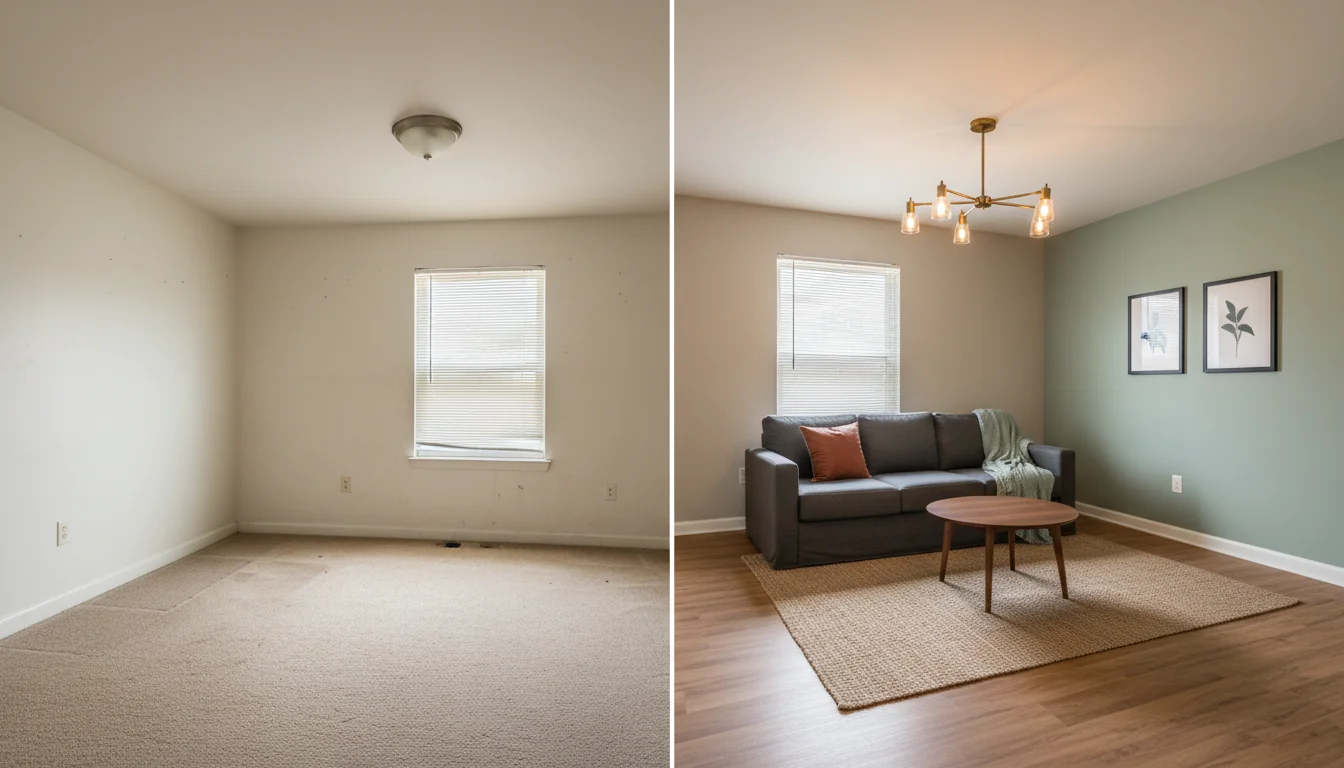
The kitchen has the same oak cabinets you inherited in 2014. The carpet in the second bedroom is on its third tenant. The walls are the color landlords paint walls — that almost-white that’s not quite white. The unit is going on the market in eleven days, and you’re standing in the empty living room with a paint deck in one hand and a calculator in the other, trying to decide whether $4,200 of cosmetic work nets you another $90 a month in rent or just $15.
AI interior design for landlords is built for that calculator. It collapses the “what if I paint? what if I swap the lighting? what if I do the floors?” decision into a stack of photoreal renders you can compare on a phone, side by side, before calling a contractor or buying paint. This guide is the operator’s playbook: what AI actually changes about the capex-versus-rent-lift decision, the three refresh tiers most small landlords cycle through, how to use renders to market a vacancy and justify rent increases, and the turnover workflow that gets the next tenant in faster with less spend.
What is AI interior design for landlords? AI interior design for landlords is the use of generative AI tools to take photos of a rental unit and produce photorealistic previews of cosmetic refreshes — paint, lighting, flooring, fixtures, decor — before any work is committed. Landlords use it to price renovations against expected rent lift, market vacancies with styled photos, justify renewal increases to existing tenants, and brief contractors with a visual scope rather than a verbal one. The goal isn’t pretty pictures; it’s a better decision per dollar of capex. RoomGenius and similar tools turn a single photo into three to six refresh variations in under five minutes, for the cost of a coffee per render.
The “paint or replace” decision, visualized
The most common cosmetic decision in a rental portfolio isn’t whether to renovate. It’s whether the unit needs paint or replacement — paint or new flooring, paint or new cabinet doors, paint or new lighting. Each tier costs roughly 5–10x the previous one, and most landlords hit the wrong answer at least 30% of the time on instinct alone.
Here’s the rough cost ladder for a typical 850 sq ft two-bedroom unit, 2026 averages, in a U.S. secondary market. Adjust 30–60% upward for major-metro labor.
| Refresh tier | Scope | Cost | Time on site | Typical rent lift |
|---|---|---|---|---|
| Cosmetic | Paint, hardware, light bulbs, switch plates | $400–$1,200 | 1–3 days | $25–$60/month |
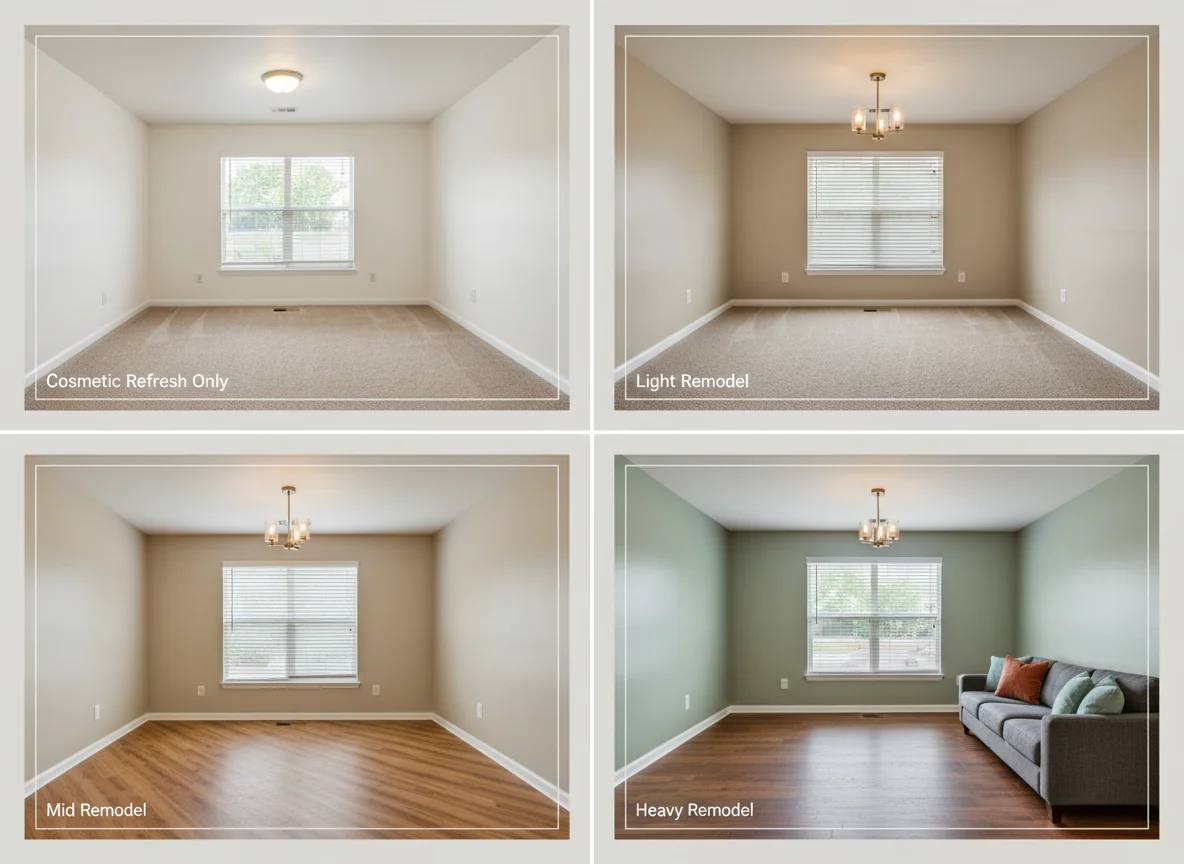
| Light remodel | Cosmetic + new lighting fixtures, faucets, blinds | $1,500–$3,500 | 4–7 days | $50–$120/month |
| Mid remodel | Light remodel + LVP flooring, cabinet refacing, kitchen counters | $4,500–$11,000 | 2–4 weeks | $100–$250/month |
| Heavy remodel | Mid remodel + appliances, full bath rehab, layout changes | $14,000–$35,000 | 6–10 weeks | $200–$500/month |
The math problem is the same on every tier: divide annualized cost by annualized rent lift, and ask whether the payback beats your hold horizon. A $1,500 light remodel that nets $80/month pays back in 18 months on rent alone — fast. A $22,000 heavy remodel that nets $300/month pays back in 73 months. The middle tier is where instinct fails most, and AI renders close that gap by letting you see whether the mid remodel actually looks like a mid remodel — or whether it ends up reading as a slightly nicer light remodel and a wasted $7,000.
For a deeper take on which categories of work actually move appraised value (which matters at refinance, not just at lease-up), our how to increase property value breakdown covers the spread between cosmetic ROI and structural ROI.
Three-look refresh: paint, fixtures, flooring
Most small landlords don’t run a full design study on every unit. They run three renders — paint-only, paint plus fixtures, and paint plus fixtures plus flooring — and pick the one where the dollar-per-month-of-rent-lift number is best for their market. The exercise takes ten minutes per unit and produces a defensible answer.
Paint only. The cheapest variation, and the highest ROI per dollar in almost every market. The render answers a specific question: does the unit photograph as “fresh” with new paint and nothing else? For 60% of units, the answer is yes — and the rest of the budget should stay in the bank. Push the AI toward warm greige (Sherwin-Williams Agreeable Gray, Benjamin Moore Edgecomb Gray, or their close-enough analogs) on the main walls and a single accent wall in the living room or primary bedroom. Dark accent walls render badly with builder-grade trim; warm mid-tones render well.
Paint plus fixtures. Add new ceiling fixtures, faucets, cabinet pulls, and blinds to the render. This is where the rent-lift curve bends upward. A 2024 NARPM operator survey of 1,400 single-family rentals found that swapping ceiling fixtures and faucets — a $400–$900 line item with a one-day install — accounted for roughly 40% of the photo improvement on rental listings, and listings with refreshed lighting rented 7–12 days faster than paint-only refreshes in the same ZIP code.
Paint plus fixtures plus flooring. The big swing. Luxury vinyl plank (LVP) is the standard rental flooring upgrade in 2026 — durable, water-resistant, photographs as warm wood, runs $3.50–$6/sq ft installed. The render answers whether the unit reads as a different category with LVP, or just the same unit with nicer floors. In about 70% of cases the upgrade is real and visible; in the other 30%, dated bathrooms or dim natural light pull the perception back down and the LVP money is better spent elsewhere. The render makes that call cheap.
For the renter-side companion piece, our removable wallpaper for apartments post covers reversible upgrades — useful context for what to allow in the lease.
Marketing a vacancy with AI renders
The vacancy is where AI renders pay for themselves on the first turnover. Listing photos drive most of the saved-and-shared decision on Zillow Rentals, Apartments.com, Rentometer, and the rest of the modern rental search stack. An empty, freshly painted unit photographs as empty. A virtually staged version of the same unit photographs as a place someone could live in tonight.
The 2025 Apartment List rental supply report tracked roughly 2.1 million single-family and small-multifamily listings across the 100 largest U.S. metros. Listings with five or more interior photos rented 11 days faster than listings with two or fewer; listings with at least one staged or styled photo rented 14 days faster than empty-room-only listings. At a $1,800 median rent and $60/day vacancy cost, that’s $840 in saved vacancy per turnover — for staging photos that cost $25–$80 to produce.
The rules differ from for-sale virtual staging. There’s no MLS, no NAR Code of Ethics, and no formal disclosure rule for rental virtual staging in most states. Best-practice anyway: a short “virtually staged” caption on any image showing furniture the unit doesn’t convey, a paired empty-room photo for the highest-leverage rooms, and a line in the listing description noting that photos include rendered furniture and the unit is delivered unfurnished. The goal is to short-circuit the “wait, the photos didn’t look like this” moment at the showing.
For the broader staging discipline that translates to rental marketing, our home staging before and after post is the closest reference. If you operate at scale, the virtual home staging app overview covers the consumer-grade tools that have caught up to what staging companies used to charge $400 a room for.
Before-and-after photos for rent-increase justification
The hardest tenant conversation in every landlord’s year is the renewal that comes with a rent increase. The tenant has lived there twelve months, paid on time, and the lease is up. Market rent has moved $90/month. The landlord wants $75 of that. The tenant wants none of it.
The conversation goes better when the rent increase is anchored to visible improvement. AI before-and-after renders give you that anchor without requiring the actual work to have happened yet — you can present the planned refresh that will land at lease renewal, paired with a stable rent for the year after. “I’m raising the rent $60 starting July 1; here’s what the unit will look like by the end of the month, and here’s what the lease covers.”
A handful of operator-tested patterns that work better than a flat increase letter:
A two-render comparison — current state and post-refresh state, side by side, sent as a PDF or image attachment with the renewal letter. The bundling matters; separated, the upgrade reads as a sales pitch and the increase reads as the bill.
A line-item upgrade list under the rendered photo: “Refreshed paint throughout, new ceiling fixtures in living and primary bedroom, new kitchen and bathroom faucets, new mini-blinds.” Three to five items, no jargon, no “modernization” euphemisms.
A signal of the next thing on the schedule. “Carpet replacement in the second bedroom is scheduled for spring 2027.” Even a soft commitment to future work changes the rent increase from a transaction into a relationship.
The retention math is uncomplicated. The 2024 NARPM data on small-portfolio landlords put the all-in cost of a turnover — vacancy, marketing, light refresh, legal — at $2,200–$4,400 for a single-family rental. A $60/month rent increase that holds the tenant because the upgrade landed beats a $90 increase that triggers a non-renewal, every time.
Unit turnover workflow
The full turnover workflow with AI renders looks like this. The active time is two to three hours of the landlord’s labor; the elapsed time is whatever the contractors take.
Day 0 — Move-out walk-through. Before you start cleaning, take five photos of every room: a corner shot for orientation, the wall most in need of paint, the flooring, the kitchen, the bathroom. This is your “current state” set.
Day 1 — Run three renders. Produce three variations of the living room and primary bedroom: paint-only, paint plus fixtures, paint plus fixtures plus flooring. Total render time: 20 minutes. Total spend: under $10.
Day 1 — Build the spreadsheet. Three columns: cost, rent lift, payback months. Fill them in for each rendered tier using comparable rentals in your ZIP code (Zillow Rentals or Rentometer percentile data). Pick the tier where payback beats your hold horizon by at least 50%.
Day 2 — Brief the contractor with the render. Send the chosen render plus a written scope. The render eliminates most of the back-and-forth on color, finish, and fixture choice — the accent wall ends up the color you actually picked, not what the painter assumes “warm greige” means.
Days 3–10 — Work happens. Standard turnover work, with a visual reference everyone can point to.
Day 11 — Capture the new state and stage the listing photos. Same five-photo angles as Day 0. Run a virtual staging pass on the empty post-refresh photos. Caption the staged photos and publish to Zillow, Apartments.com, Rentometer, and Facebook Marketplace. Most small landlords get applications within 72 hours on a properly staged listing in a balanced market.
Day 11+ — File the renders and receipts. Both go in the unit’s capex folder. The renders are useful at refinance, at sale, and at the next renewal cycle.
The whole loop runs in under two weeks of elapsed time on a cosmetic-refresh turnover. What used to take 35–50 days from move-out to move-in shrinks to 18–25 days — most of the savings from faster contractor briefings and faster lease-up off staged photos. For the upstream category overview, the AI interior design app primer covers the broader landscape.
Tax and capex sanity-checks AI won’t make
A render shows you what the refresh looks like. It won’t tell you which line items the IRS treats as a deductible repair versus a depreciable improvement — and that line matters more for landlord cash flow than for almost any other small-business category. Paint and minor fixture swaps usually deduct in the year paid; flooring, cabinet refacing, and bathroom rehabs typically capitalize over 27.5 years. The IRS’s Publication 527 is the authoritative reference. The render doesn’t make that call — your accountant does — but having the rendered scope makes the conversation faster and the categorization more defensible.
Frequently asked questions
How accurate are AI interior design renders for rental units in 2026?
Accurate enough for decision-making, not always accurate enough for contractor work orders. The 2026 generation of AI redesign tools — RoomGenius and the major competitors — produces renders that match the actual finished work in style, color, and overall feel about 85–90% of the time on cosmetic refreshes (paint, fixtures, decor). Accuracy drops on dimensional changes (new cabinets, layout changes) where the AI infers measurements from the photo rather than measuring them. For a paint-and-fixtures decision, the render is reliable enough to commit budget to. For a full kitchen rebuild, treat the render as a style reference and pair it with a measured drawing.
Can I use AI renders for tenant communication without crossing into misrepresentation?
Yes, with two guardrails. First, make it explicit when a photo is a render of a planned refresh versus a photo of the current state — a one-line caption (“rendered preview of planned 2026 refresh”) solves this. Second, deliver what the render shows. Tenants who see a render and then move into a unit that looks materially worse than the rendered version push back hard, and the resulting friction costs more than the rent increase the render was supposed to support. Use renders to communicate scope, not to oversell.
How does AI interior design change the rent-versus-sell decision on an old rental?
It compresses the analysis from days to hours. Produce three refresh tiers, three rent-lift estimates, and a quick comparable-sales valuation on the same afternoon. The output is a defensible decision tree rather than a vibe — sell if cleanly above basis at current condition, refresh if the mid-tier render adds enough rent lift to clear your cost of capital, hold-and-do-nothing if comps and rent both suggest sitting out the cycle.
Will showing AI renders to a tenant actually help with retention at lease renewal?
The data is preliminary but consistent. A 2025 BiggerPockets operator survey of roughly 600 small-portfolio landlords reported renewal rates 8–14% higher among landlords who paired rent increases with documented upgrade plans (rendered or otherwise) versus landlords who sent flat increase letters. The mechanism appears to be expectation management — tenants don’t object to rent increases per se; they object to feeling like they’re paying more for the same thing. A render that previews the work converts the increase from a unilateral price action into a transparent trade.
What’s the minimum spend that justifies running an AI render before the work?
Roughly $500. Below that — replacing a single light fixture, repainting one wall — the decision is too narrow for a render to add value, and a quick photo of the existing space with a comp from Pinterest is enough. From $500 to about $4,000, a render is the highest-ROI five minutes you’ll spend on the unit; the cost of a wrong call at that level (wrong paint color, wrong fixture, wrong flooring) exceeds the render cost by orders of magnitude. Above $4,000, run multiple renders. Above $10,000, pair the renders with a contractor walk-through and a measured drawing — at that level, the render is necessary but not sufficient.
Do these tools work for multifamily, not just SFR?
Yes. For multifamily units — duplex, fourplex, garden-style apartment — the renders are functionally identical to the SFR case, and most small landlords running mixed portfolios use the same workflow across product types. The AI is strongest on living rooms, bedrooms, kitchens, and bathrooms. Hallways, lobbies, and small commercial spaces work, but the style options are narrower and the output skews “residential converted” rather than “commercial native.”
Visualize the refresh, price the refresh, make the call
The rental unit waiting for its next tenant doesn’t need a designer. It needs a clear answer to one question: which version of the refresh produces the best rent-lift-per-dollar, and is that number better than leaving the unit alone? AI interior design for landlords turns that question from a multi-week debate into a ten-minute exercise. Run the three tiers, run the math, brief the contractor with a render, list the unit with staged photos.
Open RoomGenius, upload a photo of the unit you’re turning next month, and have your three refresh renders before the contractor returns your call.