AI Interior Design for Event Planners: Venue Previews in Minutes
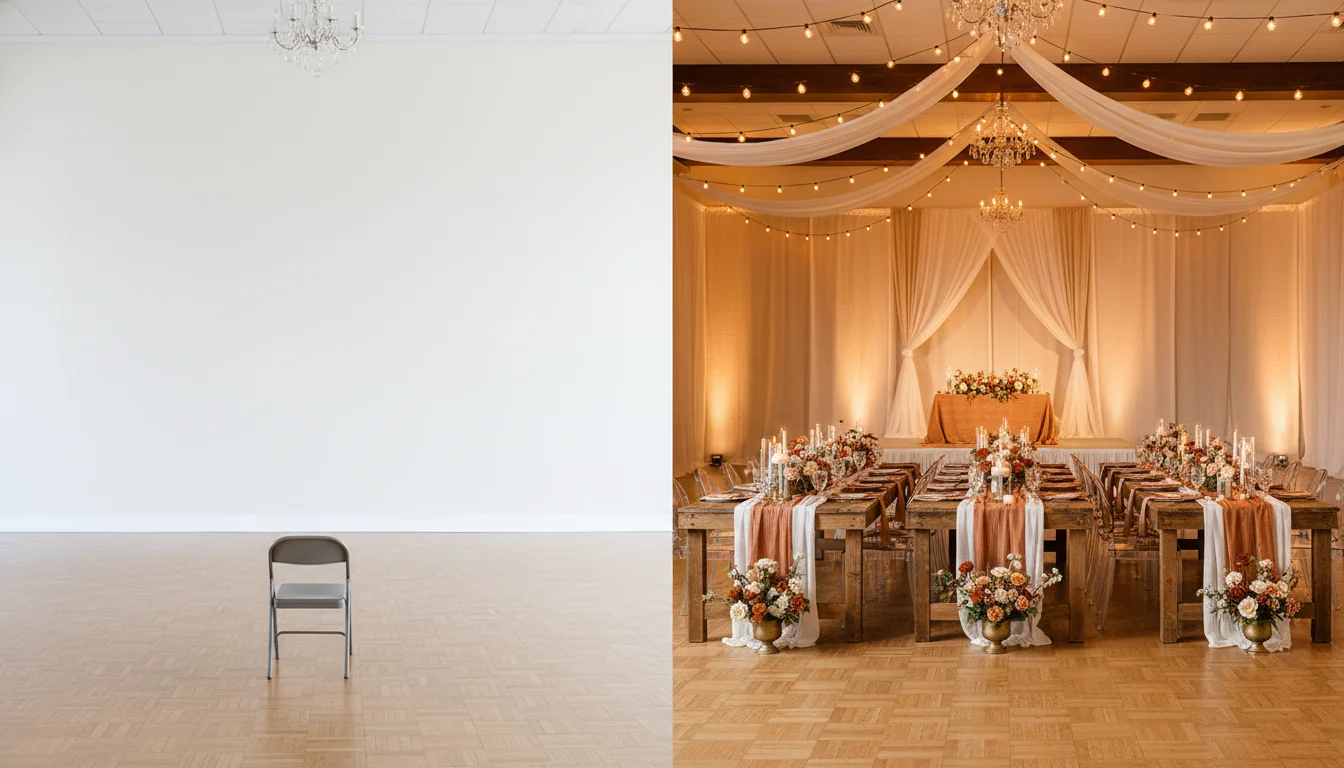
The bride is sitting in the ballroom on a folding chair the venue scrounged up. The floor is parquet, the walls cream, the ceiling twenty-two feet up with two basic chandeliers, and you are doing the thing every event planner does fifty times a year — narrating the wedding into the empty space. “Imagine farm tables down the long axis, terracotta runners, candles in low brass vessels, a ceremony arch right where that pillar is, amber bistro lights swagged from the beams.” The bride nods. Her mother does not. The deposit is twelve thousand dollars and you can see the doubt landing in her eyes faster than your sentence.
AI interior design for event planners ends that conversation by replacing it with a picture. You take one phone photo of the empty venue, run it through an AI redesign, and twenty minutes later you are showing the same family a photoreal render of the room as it will look on the wedding day — farm tables, runners, florals, lighting, ceiling installation, the whole evening. This guide is the working playbook for wedding planners, corporate coordinators, and venue sales teams in 2026: why narrated walkthroughs lose deals, the five-minute preview workflow that closes them, how the styling brief differs between a wedding reception and a corporate gala, what AI gets right and wrong about lighting, and how to share renders with clients and vendors.
What is AI interior design for event planners? AI interior design for event planners is the use of generative AI tools to take a photo of an empty event venue and produce photorealistic styled previews of how the space will look during the actual event — tables, linens, florals, lighting, draping, signage, and decor. Planners use it as a sales tool to close venue contracts, as a brief to align rental vendors and florists around a single visual scope, and as a check on whether the design they’re describing actually fits the room. RoomGenius and similar tools render a styled venue preview in 30–90 seconds per scene, for a few dollars per render — small enough to show three style directions on a discovery call without committing any vendor inventory.
Why venue photos fail to sell clients
Every venue has a marketing photo set. It is not the problem. The problem is what those photos are of. Venues photograph their spaces dressed for one specific event — usually the most photogenic wedding the venue ever hosted, lit by a professional with bounce flash, color-graded for the website. The bride’s family looking at those photos in your conference room cannot see their event. They see someone else’s event in a room they have not yet learned to read.
The narrated walkthrough fails for the same reason. About 70% of event clients are visual decision-makers in the strict sense — they cannot translate a sentence about “long farm tables down the central aisle with terracotta runners” into an actual mental image of the room. They translate it into a vague feeling of “yes that sounds nice” that does not survive the drive home, and certainly does not survive the spouse who could not attend the walkthrough asking what it is going to look like. The deposit decision happens at the kitchen table that night, and the kitchen-table conversation has no visuals.
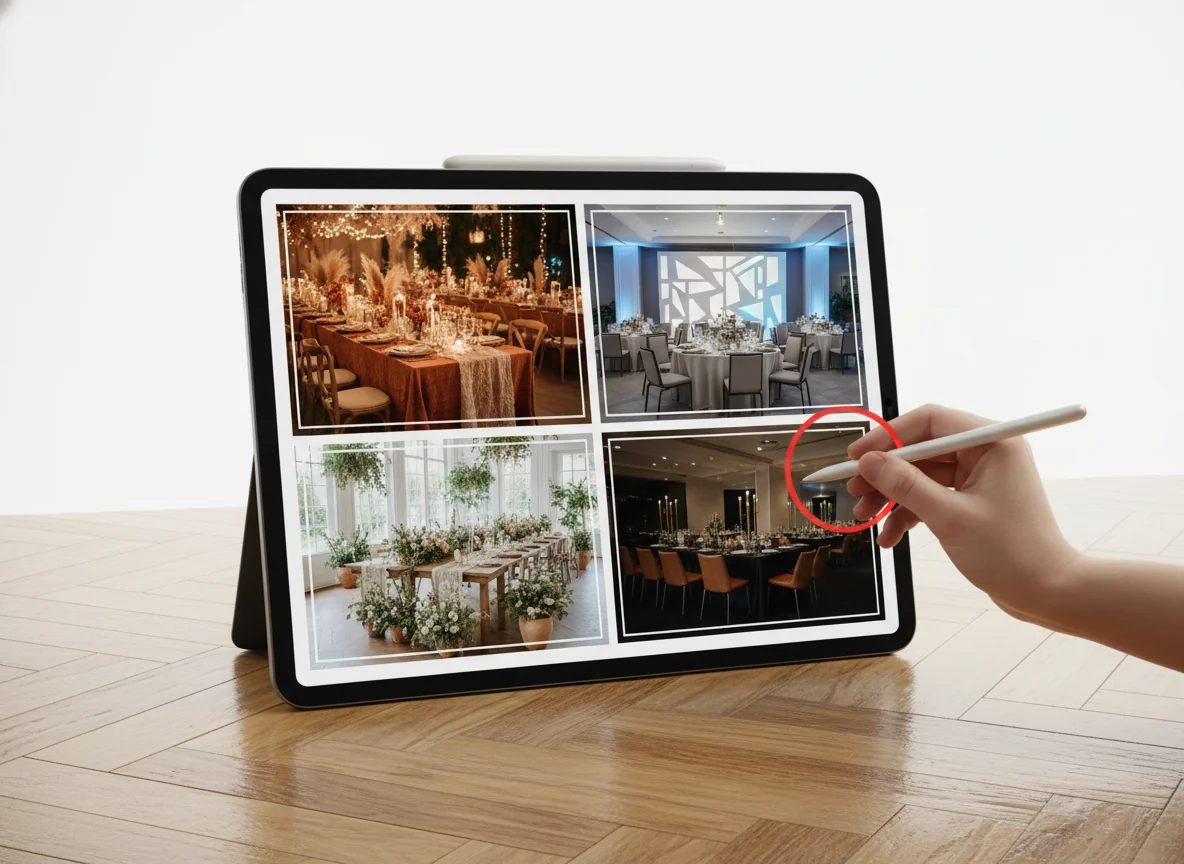
The third failure mode is the moodboard. Pinterest, Canva, the bound binder of inspiration — all of it shows pieces of the event in other venues, lit differently, shot at different angles. The client gets excited about the moodboard, sees the actual ballroom, and the gap between the two is wider than they expected. Cancellations and downgrades cluster in the two-week window after the walkthrough, and the cause is almost always a mismatch between the picture in the client’s head and the picture in the room.
A useful frame: the empty venue is a blank canvas the client cannot paint themselves. Until 2024, the planner’s only tools for filling that canvas were words, gesture, and other people’s photos. The render closes that gap — the client’s specific event, in the client’s specific room, twenty minutes after the walkthrough ends.
The five-minute AI venue preview workflow
The workflow that converts walkthroughs into contracts looks the same across wedding, corporate, and private events. It runs in five steps and finishes in about twenty minutes from the time the venue door closes behind you.
Step 1 — Shoot the venue from the camera angle of the event’s hero photo. Most weddings have one hero shot — head-on of the head table, the aisle from the back, or guest’s-eye from the entry doors. Most corporate events have two — keynote-from-the-back and cocktail-reception-from-the-bar. Shoot those angles on a phone, with the lights as they will be at the event.
Step 2 — Brief the AI in the four-variable language clients understand. Style + materials + mood + function. “Romantic English garden wedding reception, long oak farm tables, terracotta linen runners, ivory and rust florals in low brass vessels, amber bistro string lights swagged from the beams, ghost chairs, candle-heavy, 120 guests at six tables.” A four-variable brief gets a four-variable render.
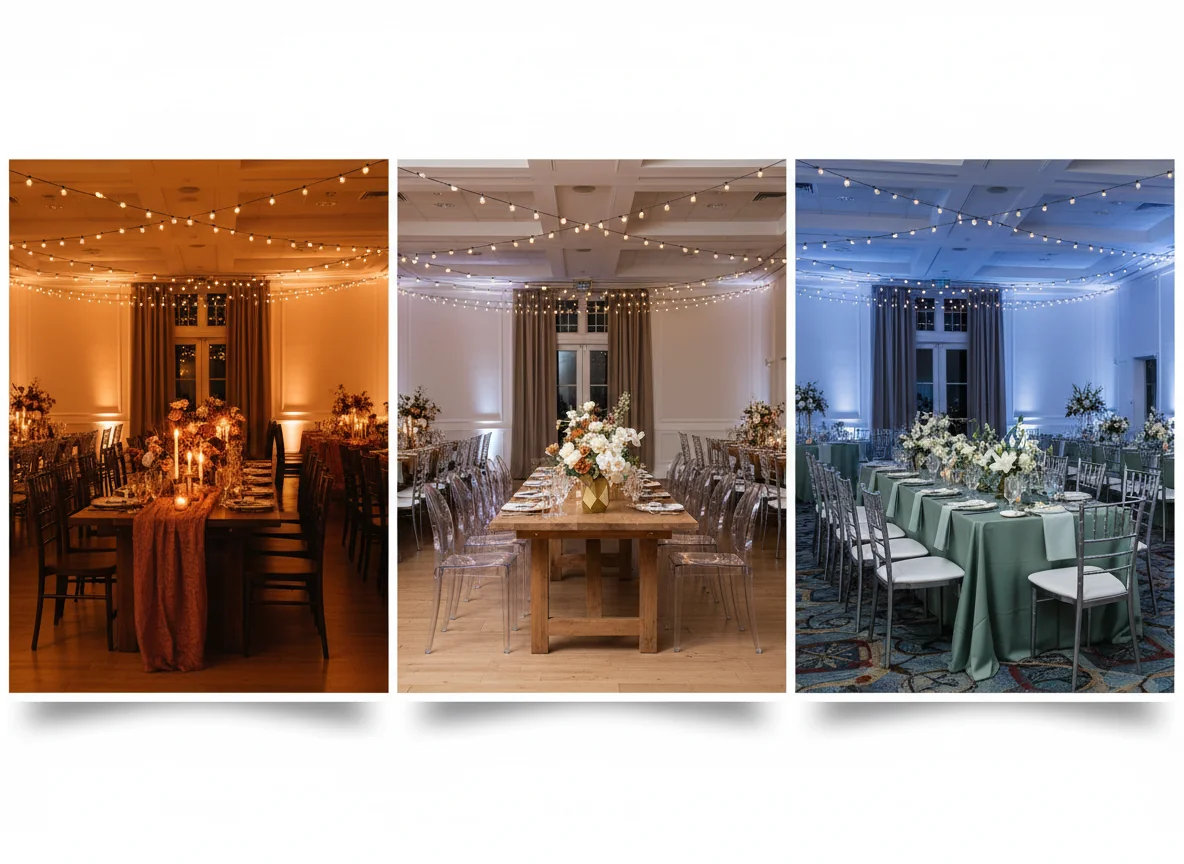
Step 3 — Render two to four directions per scene. Not one. Showing the client a single render hides the design decision; showing two or three reveals it. Render the client’s stated direction, the version your gut says will photograph better, and one wildcard. Most clients pick one of the three immediately, and the one they pick is the one to commit vendors against.
Step 4 — Annotate the chosen render with the scope. “Twelve farm tables, 96 ghost chairs, 14 floral arrangements at 18-inch height, 8 strings of bistro lights, 24 pillar candles.” The render is the visual half of the proposal; the annotation is the financial half.
Step 5 — Send the render with the contract. Not before. The render is the close, not the lead magnet. Send it before the deposit and the deal collapses into endless revisions; send it with the contract and the client’s “yes” anchors to the picture in front of them.
End-to-end, the workflow takes fifteen to twenty-five minutes per scene. A wedding with three hero scenes is an hour of work — work the same brief delivered as a moodboard would have taken three hours and not closed. Our conference room setup ideas post covers camera-angle and lighting patterns that translate cleanly into renders.
Wedding reception vs corporate-event styling
The same empty ballroom dresses two completely different events, and the AI brief that produces a closing render for one is not the brief that closes the other. The differences are not subtle. Getting them right in the prompt is where new users of AI design tools save the most time.
A wedding reception is built around emotional density at the centerline. The eye walks the aisle to the head table, and every styling decision either supports that walk or distracts from it. Renders that work for weddings concentrate visual interest along the long axis — tablescape repetition, low florals, candles at multiple heights, ceiling installations directly over the head table. The client is buying a memory; the render is selling the moment of the first dance.
A corporate event is built around legibility from any seat. The keynote screen has to read from row twenty, brand colors have to survive a phone camera at the back of the room, and the styling cannot compete with the content. Corporate renders concentrate visual interest at the front — branded backdrops, controlled lighting, neutral table styling, lounge clusters that read as “premium” without dominating. The render is selling the photo the marketing team will post to LinkedIn afterward.
Private events — birthdays, anniversaries, fundraisers — sit between the two. A 60th birthday usually wants the wedding playbook with less floral; a foundation gala usually wants the corporate playbook with more lighting. The render conversation surfaces which direction the client actually wants in ten minutes, where a moodboard conversation can take a month.
| Dimension | Wedding reception | Corporate event |
|---|---|---|
| Centerpiece of the render | Sweetheart or head table | Keynote stage and screen |
| Lighting style | Warm, candle-heavy, amber bistro | Controlled, branded, dimmable |
| Color temperature | 2200K–2700K (very warm) | 3000K–4000K (neutral white) |
| Florals | High visual weight, organic | Low weight, structured, branded |
| Table styling | Layered linen, mixed metals | Monochrome, minimal, brand-aligned |
| Seating | Mixed (ghost, cross-back, banquet) | Uniform, often branded chair caps |
| Ceiling treatment | Draping, installations, candles | AV trusses, projection-friendly |
| AI prompt focus | ”Romantic, candlelit, organic" | "Modern, branded, professional” |
| Render’s job in the sale | Emotional close | Stakeholder approval |
A practical rule for the brief: for weddings, prompt the AI for the dinner moment, not the cocktail hour. For corporate, prompt for the keynote moment, not the networking. The moment that closes the deal is the peak emotional or stakeholder moment, not the warm-up. Our corporate event decoration ideas post breaks down the corporate styling vocabulary that translates cleanly into AI prompts; wedding venue decoration ideas covers the wedding-side equivalents.
Lighting and color temperature in AI renders
Lighting is the single largest gap between a render that closes a contract and a render that confuses a client. AI tools render light better than they render anything else — sometimes more beautifully than the actual venue at the actual event. Show a client a render lit at golden hour for a 9 PM February reception and the gap on the day becomes a complaint.
The fix is almost always skipped: prompt the AI with the actual lighting plan, not the prettiest one. Three numbers do most of the work. Color temperature in Kelvin (2200K candle-warm, 2700K incandescent, 3000K warm-LED, 4000K neutral, 5000K+ daylight). Light source mix in plain English (“80% candlelight, 20% amber bistro, no overhead”). Time of day equivalent (“renders should look like 8 PM in winter, not 6 PM in summer”). Those three lines cut the day-of “the room looks darker than the render” complaint by most of its volume.
Categories that need explicit lighting briefs: the wedding first dance (pin-spotted on the couple, ambient elsewhere — AI defaults to even lighting unless told otherwise); the corporate keynote (controlled stage wash, deliberately dim audience tables, fill light on side aisles); the cocktail hour (almost always brighter than the dinner that follows — render both); and outdoor or tented events (AI sometimes renders these as eternal golden hour, which sets the wrong expectation).
A planner’s tell that lighting is wrong in the render: clients say “it looks great but a little flat” or “is it really going to look like this at night?” Both are color-temperature and light-mix problems. Re-render with the explicit Kelvin number and the result usually closes the gap. The Illuminating Engineering Society’s lighting library has the technical underpinning for the temperature-and-lumens choices behind those numbers.
Sharing renders with clients and vendors
The render is not just a sales asset. It is the single visual brief that aligns every vendor on the event, and how it gets shared decides whether that alignment holds.
With clients, the rule is one render per chosen direction, sent in the contract email, with a one-line annotation describing the scope it implies. Sending five rendered options post-deposit invites scope creep — every option re-opens a styling decision the contract already closed. Treat additional variations as a revision round, not a follow-up email; most planners in 2026 charge a small fee per render after the third.
With florists, the brief is the render plus a line-item floral list (“14 arrangements, 18-inch height, ivory and rust palette, low brass vessels, no foliage taller than 14 inches”). Florists work faster against a render than against a Pinterest board because the render shows the relationship between flowers and the rest of the room — linen, candles, chair color — that a floral inspiration shot leaves them to guess at.
With rental companies, the render plus a quantity sheet replaces three back-and-forth emails: “120 ghost chairs, 12 oak farm tables (8 ft), 12 ivory linen runners, 24 pillar candles, 1 sweetheart table with hand-tied linen drape.” The render answers questions the quantity sheet leaves open — orientation, mixing, accent items.
With venues, the conversation is more delicate. Some venues love planners using AI renders because the renders close bookings faster; others get nervous about misrepresentation. The clean approach is to share the render with a “design intent for the contracted event” caveat in writing, and to confirm the install matches the venue’s load-in rules before the day. About 15% of venues in 2026 now ask planners to submit renders as part of the COI and floor-plan packet.
For private events on the property of the host — backyard weddings, home anniversaries, residential birthdays — the render doubles as a homeowner’s preview, and spouses or parents who would never have approved the original budget often approve the same budget once they see it. Our virtual home staging app post covers the adjacent residential-staging workflow.
Frequently asked questions
How much does it cost an event planner to use AI interior design per event?
For a typical wedding or mid-size corporate event with three to five rendered scenes in two or three style directions, the AI rendering cost runs $25–$120 in 2026. Most planners use a monthly subscription covering 30–100 renders for $40–$120 — the cheapest line item in any event budget. Compared to the typical planner’s hourly rate, replacing two to three hours of moodboard assembly per direction with twenty minutes of rendering pays for the subscription on the first event of the month.
Will clients understand that the render is a preview, not a guarantee?
Yes, if you frame it in the cover note. The phrase that works in 2026 is “design intent render — the styling, layout, and lighting target our team is building toward, subject to vendor inventory and venue policy.” Most clients understand “render” the way they understand an architect’s render — it’s the target, not the guarantee. Problems happen when planners send the render without that framing and the client treats it as a contractual promise of every visible item.
Can AI design help during venue selection, before a contract is signed?
Yes, and it’s becoming one of the most leverage-heavy uses of AI in event planning. A couple choosing between three venues can see their wedding rendered in each one — same style brief, same guest count, same color palette — and pick the venue where the design fits cleanest. Venues love it because it accelerates the decision; planners love it because it pre-aligns the client to the design before the contract is signed, which makes every later vendor decision faster.
How does AI rendering compare to traditional 3D event-design software?
3D event-design software (AllSeated, Social Tables, similar) is built around precise floor plans and does table count, capacity, and ADA compliance well. It does not do photoreal styling well — the output reads as a 3D mockup, not a finished room. AI rendering does the opposite: photoreal styled previews from a photo, but no floor plan or capacity check. Most planners in 2026 use both: the 3D tool for technical layout, the AI render for the client-facing visual sell.
What about events in unusual venues — barns, museums, industrial spaces, tents?
AI renders well-photographed venue types cleanly. Common ballroom and banquet-hall photos render almost flawlessly. Less-common architectures — exposed-truss barns, museum atriums with unusual sightlines, tented events with translucent ceilings — sometimes produce renders where the styling is right but the architecture has been lightly hallucinated. For those, render the styling on a single section (head table, cocktail bar, entry) rather than the full venue, and assemble the client-facing brief from multiple partial renders.
Close the venue contract with a render, not a pitch deck
The next walkthrough on your calendar will end the way they all end — the client at the doorway, looking back at the empty room one more time, your sentence about “imagine the farm tables down the centerline” hanging in the air. The pitch deck in the follow-up email will land when the client is no longer in the room. The render is the only thing that puts them back there, on the actual day, with the actual event in front of them.
Open RoomGenius, upload tonight’s photo of the empty venue, and send the contract with the render attached — before the doubt sets in at the kitchen table.